Dipl.-Ing. Hartmut Rosch
Does VRML Supersede all 3D-CAD-Formats
?
1. Introduction
A new technology, the Virtual Reality Modeling Language
(VRML), brings architecture, space and place to the World Wide Web. Using
VRML, you can create solid looking objects as easily as you can create
a homepage. While a homepage is mostly a textural file why should VRML
more complicated ? Only a little has to consider and Therefore many VRML-browser
appeared on the market. Now it becomes very convenient to display more
or less complex threedimensional objects on screen, zooming and panning
the object around.
Looking at this, there is no clear difference to
rendered three dimensional CAD object. And it has some advantages such
as animation, motion physics, real-time, multi-user interaction and models
which could be hyperlinked to other 3D models. At this time the question
comes up, could VRML dataformats replace existing CAD dataformats ?
This paper looks at the most important parts of both
subjects. The first section will discuss the usage of a CAD system and
how users are working on such a system which is followed by showing one
of the possibilities of the to accompaning data structures used to retrieve
geometrical information from that data. Section 2 is devoted to VRML. With
VRML browser people are able to look at or walk through the design and
this in a sufficient short time. The needed resulting data structure could
be very compact because they only have to deal with points, lines and polygons
which could be rendered. The last section shows the implied limitations
and some surrounding topics like the persistence of data. The issue of
legal rights will only be touched.
2. CAD Systems
2.1 A User Point of View
CAD systems are closely connected to Graphical User
Interfaces (GUI) but not that kind which commonly knowned through wordprocessors
or spreadsheets. However they are mostly designed to give a smooth input
device for human beings to an electronically drawing board.
 Early
works by Bruns et.al. [BRUN93] and Brauer et.al. [BRAU95] showed that those
approaches among other led to isolation, sensomotorical deprivation and
reality loss. Several efforts are being undertaken to improve the handling
of CAD systems. One approach is to look at the user how they make up a
mental model during their design process as Hacker [HACK94] and Sachse
[SACH95] do and the other approach is to add 'virtual reality' like Bayliss
et.al. [BAYL94] did.
Early
works by Bruns et.al. [BRUN93] and Brauer et.al. [BRAU95] showed that those
approaches among other led to isolation, sensomotorical deprivation and
reality loss. Several efforts are being undertaken to improve the handling
of CAD systems. One approach is to look at the user how they make up a
mental model during their design process as Hacker [HACK94] and Sachse
[SACH95] do and the other approach is to add 'virtual reality' like Bayliss
et.al. [BAYL94] did.
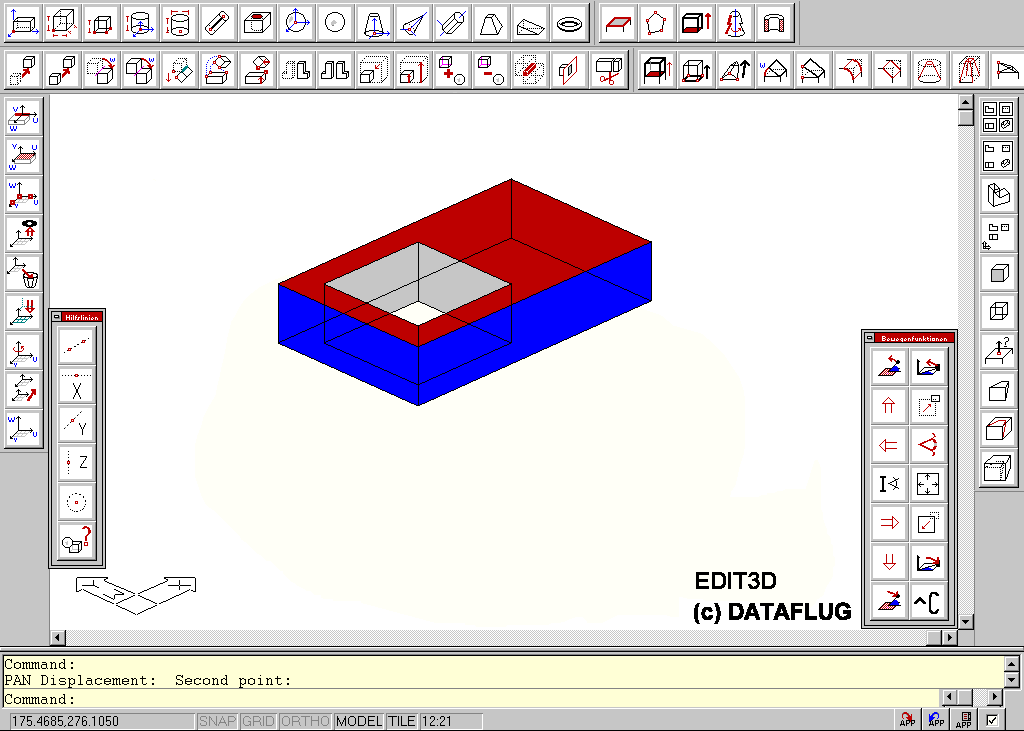
Nevertheless commercial CAD systems are still using
the known kind of interface as it is depicted in Fig. 1 with buttons around
the edges of the display for easy interaction with the system. To aid the
designer through the designprocess some grouping of the creating and manipulating
commands are done. To made things more intuitive several icons are developed
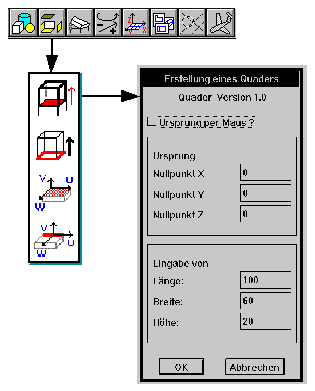
which reflects actual needs i.e. like translating a surface. If such an
interface, Fig 2, is in some accordance with the expectation of the user,
this user feels very comfortable with and this is important to design efficiently
in 3D space.
Figure 1
Figure
2 |
I would like to lay some emphasis on how
an engineer or architect is working to show the difference to VRML later
on. She/he has to create or modify some new or existing products. That
starts mostly with a mental model of the product in their mind [SACH95].
With the help of a user interface the designer creates 3D objects like
boxes, spheres, cones and much more. So they need the capability to draw
points, lines, circles and 3D faces and many more entities. This is easy
to achieve. But their main work are usually the altering of existing products,
i.e. their associated drawing on a CAD system. So they have to modify all
or some of the 3D objects with their accompaning points, lines, circles
and all other items just mentioned above. Without any help the job would
get clumsy and annoying so they need some tools to the work done.
One of those tools is to use a Graphical User Interface.
A typical GUI for CAD systems, Fig. 2, has a toolbar, from whom she/he
can choose a pulldown menu for a group of tasks which led to the necessary
commands to create or modify an object. Eventually she/he has to use some
dialogboxes which visualizes the step that has to be done to complete the
command. |
It could be stated, that the objective of an engineer
or architect is to create and modify a product which has to be constructed
somehow.
2.2. Looking at Data Structures
The typical user is normally not interested which
datastructure is employed with the CAD system she/he is using. In the general
case, those datastructures consists of topological and geometrical information.
Those information are inherent in the datastructure, see for example Mäntlyä
[MÄNT88] on how a solid modeler could be implemented, every volume
"knows" the faces which makes the object.
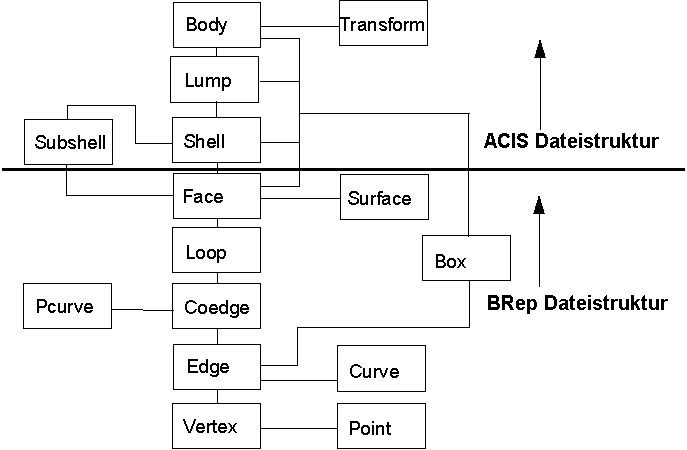
Figure 3
A more recent approach has led to a 3D boundary-representation
(B-Rep) geometric modeler [ACIS95] which calls themself a solid modeler
because it can determine whether a position is inside, outside, or on the
boundary of a volume. The model representation consists of varius attributes,
geometries, and topologies. ACIS decomposes solid and sheet bodies into
the classes shown in Fig. 3. These classes provide the data and methods
necessary for a true boundary representation solid modeler. Pointers up
and down the hierachy allow quick traversal of the data.
Therefore it is fairly straight forward to modify
a complex model just by picking somewhere on the surface or edge and then
by traversing through the topology to find the geometrical values. This
in turn allows to modify the geometry to solve the task. The editing feature
which has to be implemented follows the line of the previous section.
If you look at CAD systems in general, you will notice
that there is a huge amount of different systems on the market. Not only
in the different market segment like mechanical or architectural design,
also in the same segment. They all try to meet the customer demand on different
ways. There from evolved the many different GUI?s for each segment. More
important, the existing of many different CAD systems and nearly all with
their own datastructure. See for example Grätz [GRAT89] for a more
detailed description.
3. VRML
3.1. What is all Possible ?
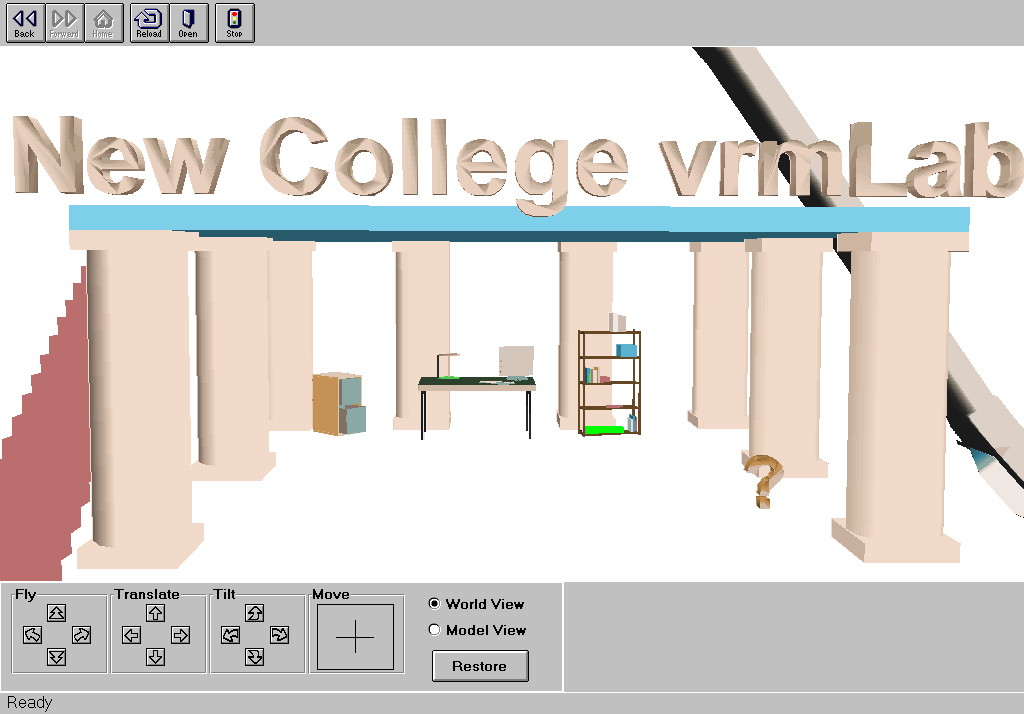
Figure 4
VRML is a Virtual Reality Modeling Language which
allows fast rendering of models or a collection of models called a scene,
see for example Pesce [PESC95]. VRML specification 1.0 which is now in
wide spreaded use, allows only static interaction i.e. flying or walking
through the world of interest. As someone is building their worlds, they
will notice that VRML 1.0 files are basically made up of Nodes (such as
Shapes, Appearance, Tansformations and so on) and the Fields that individulaize
them. This structure remains basically the same in VRML 2.0, but adds some
important new Nodes to use, including: among others scripting capabilities,
interactivity and manipulating of 3D-objects. This is accomplished through
new nodetypes which now can handle sound, animation, and a way of prototyping
which means that a background could be attached to a node and that the
background could be moved independently from a 3D object [POTE96]. Proximity
and time sensors will trigger actions like turning on a light when a person
enters a room.
To walk through such a scene you will need a VRML
browser like the one in Fig. 4. What you need is a ?special file? which
the browser could read. After starting the browser, the user is able to
navigate through the model scene by walking around or just moving the object
to have a different view. With this particular browser one could navigate
via moving the cursor in the crosshair field or clicking on the arrows
to fly, translate or tilting the scene according to the buttons. The browser
could be enhanced by using a joystick, Head Mounted Displays or shutter
glasses as the Virtual Reality community has done, see for example [HENN97].
Because VRML could be embedded in HTML the scene?s source code will be
transmitted via internet to all interesting parties all over the world.
As it will be shown later, to create a world it is
sufficient to use an editor, type some phrases and some digits which describes
the object in an appropriated way and save that data onto disk. However,
to work with a browser, the user will need a completed object. This distinguishes
CAD user from a VRML user. But it is possible to create a ?VRML-file? from
existing CAD data.
3.2. Description of 3D-Objects
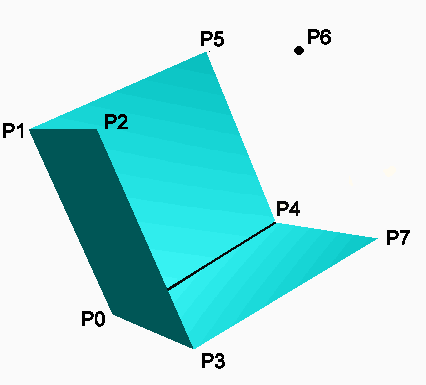
Figure 5
To achieve a good impression of a walkthrough, the
rendering and displaying for i.e. a house, has to be fast. Otherwise the
?walker? moves very slowly or jumps from one position to another. The needed
resulting data structure could be very compact because they are only dealing
with points, lines and polygons which has to be rendered. Take for example
a 3-sided shell, Fig. 5. In this case only the points P0 ...
P7 has to be defined under the phrase ?Coordinate3?, see Fig.
6. For example, VRML polygons are created with a combination of VRML nodes,
Coordinate3 and IndexedFaceSet. Coordinate3 is a list of points mapped
out in 3D space, and IndexedFaceSet is a list connecting some or all of
those points to create the polygon (similar to connecting the points).
You will notice that the row ?0, 1, 2, 3, -1? defines the dark face pointing
somewhat out of the page. As you will see the structure is very simple
and therefore very compact and this suits the demand to be fast to browse
and to transmit the data over the internet.
#VRML V1.0 ascii
Separator {
DirectionalLight {
direction 0 0 -1
# from viewer to scene
}
PerspectiveCamera {
position
-8.6 2.1 5.6
orientation -0.13
-0.98 -0.12 1.14
focalDistance
10.84
}
Separator {
# Wall geometry; just three
flat polygons
Material {
diffuseColor
0 1 1 # Green/Blue
}
Coordinate3 {
point
[-2 0 -2, -2 0 2, 2 0 2, 2 0 -2,
-2 4 -2, -2 4 2, 2 4 2, 2 4 -2]
}
IndexedFaceSet
{
coordIndex
[ 0, 1, 2, 3, -1,
0, 4, 5, 1, -1,
0, 3, 7, 4, -1]
}
}
}
Figure 6
Let us take a look at VRML from a CAD point of view.
Because of the specification of VRML, there are no topological information
provided in such data. There exists only groups of Coordinate3 and IndexedFaceSet?s
which are divided by ?Separator?. With VRML 2.0 you can define a mouse-sensible
node which you can use to do something useful, not only moving with the
mouse around the scene. Unfortunately this has be done before you can use
the browser. That means in the foreseeable future there is no way to modify
an existing geometry.
Because of the inherent differences between VRML
and CAD data every existing CAD-System has his own translator to achieve
the target of making VRML scenes from a freshly designed CAD object.
4. Validity of the Design
4.1. The Persistence of the Data
There is still a demand made by architects and engineers
to have both capabilities on their desktop. A CAD-like one to create and
modify objects and VRML-like one to show the object, or then called scene
to a prospective customer. How could this be done ?
The first task is normally dedicated to a desktop
computer which could be connected to a Local Area Network (LAN). Due to
the workflow in a company and due to the responsibility of the drafter,
some precaution are taken, that prevents sharing of progressing drawings.
This is different for VRML browser which could have links around the world.
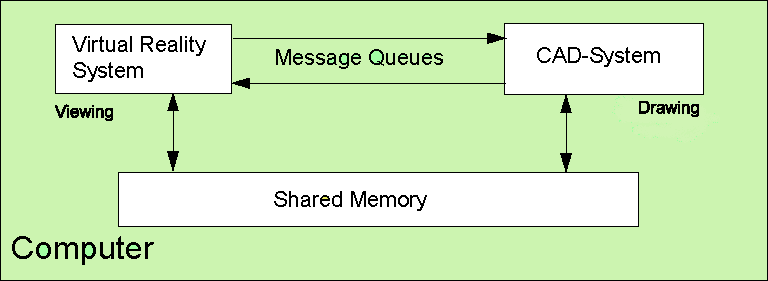
Figure 7
A schematic view of the communication structure if
both exists on one computer is given in Fig. 7. Implementing such a system
could be done via pipes or message queues and shared memory are used for
data transfer between the two components. With that concept, it is not
difficult to have a consistent model on one computer. Therefore changes
are only allowed by the CAD system via the CAD data structure and then
make them available on the VR system. That could be implemented in such
a way that upon starting the VRML browser, a translating from the CAD object
has to be performed.
I could imagine that for some specific tasks a change
in the geometry of an VRML object could be translated into the CAD system,
for example if an entire surface has to be moved. But that needs an input
device on the VRML system to put some numbers in. This is missing in the
current specification and a new VRML specification has to be upgraded in
that direction somehow.
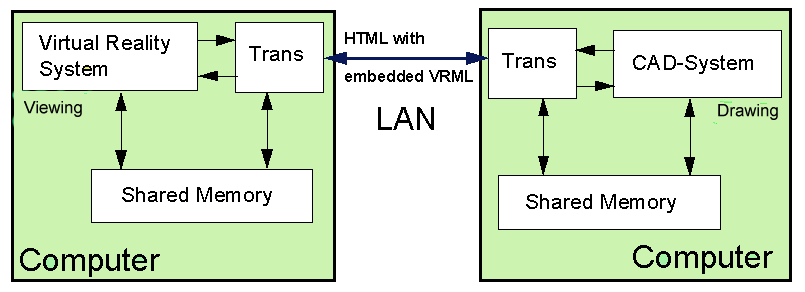
Figure 8
Now consider that we are using a LAN, see Fig. 8.
For clearity the CAD part respectively the VRML part has been omitted.
As mentioned earlier, the VRML data could be embedded in a HTML-file. Somewhere
in the world our partner uses his own browser to look at the object he
is interested in. Because of the translating of the CAD data to VRML data
on the sending site, the interrelation between CAD data and VRML data is
lost. The addressee has now no topological information about the subject
he is looking on.
If two partners are communicating via internet about
the same object, i.e. a house. The addressee is actually looking at a copy
of that object which was sent to him. Now neglecting the aforementioned
limitations and say the customer of the prospective product is somewhere
in the world and wants to make tiny changes. If both have the same capabilities,
should the customer or the contractor change the object, the design. If
both are able to do that who is locking the others file thus preventing
overwrite of valid data?
4.2. Legal Issues
The above questions led us right into the legal issues
pertain to the above mentioned questions. The construction is owned by
the buyer or customer. The design is owned by the company who invented
it. The drawings of the construction have legel copyrights upon them issued
to the company, or contractor because they could have incorperated some
new ideas to accomplish a specific task the customer has asked for.
Consider now that both parties have equal rights
in changing the drawing as it is outlined in the above section. Who is
now in charge if something happend badly by the design? This is only a
small percentage of that what could be asked if legal rights a touched.
5. Summary
There a two different worlds acting together. The
designer or engineer is used to create and modify objects via a graphical
user interface which helps to minimize the design time. Furthermore it
should help to think in Her/his own "language" according to the profession
they are working in.
Additionaly they can work on the project with all
the benefits of a CAD system and with all the tools they are using which
has evolved over the years. According to quality management systems a responsible
engineer should be identified and it should be annotated who is in charge
of the drawing.
On the other hand there is a growing demand in visualizing
objects which are still "in the computer". For example, a salesperson has
some advantages if he can show a new house to a prospective customer, and
the new house is still on the drawing board. Moreover they can virtually
walk through the object, i.e. a building and discuss changes they never
have noticed before the actual building is completed.
It is not easy to answer the question which gave
the title of the paper. If we look in the forseeable future, say 2 to 3
years, it is hardly to see any changes in both groups of the graphical
society. The tasks both groups have to fulfill are very different from
each other. I could think of a way to routinely extract geometric data
out of CAD systems so everybody could have a benefit.
6. References
[ACIS95] Spatial Technology Inc. ACIS Geometric Modeler
Application Guide, Boulder CO, 1995
[BAYL94] G.M. Bayliss, A. Bowyer, R.I. Taylor, P.J.
Wills, Virtual Manufacturing, Proceeding CSG 94 - Set- theoretic Solid
Modeling Techniques and Applications, Winchester, UK, 13.-15. April, 1994
[BRUN93] F. W. Bruns, A. Heimbucher, D. Müller,
Ansätze einer erfahrungsorientierten Gestaltung von Rechnersystemen
für die Produktion, artec-Paper 21, Universität Bremen, 1993
[BRAU95] V. Brauer, F. W. Bruns, Greifendes und begreifendes
Modellieren im Realen und Virtuellen, FORWISS-Report zum 7. Workshop Hypermedia
& KI, Hrsg. E. Neugebauer und S. Wiesener, Nov. 1995
[EDIT96] Konstruktionsmodul EDIT3D als Zusatz zu
AutoCAD Version 12, DATAFLUG Consulting, Delmenhorst, 1996
[GRAT89] Joachim-F. Grätz, Handbuch der 3D-CAD-Technik,
Modellierung mit 3D- Volumensystemen, Siemens AG, Berlin,München,
1989
[HACK94] Winfried Hacker, Zur Struktur von Handlungswissen
bei Entwurfstätigkeiten, In G. Pahl (Hrsg.), Psychologische und pädagogische
Fragen beim methodischen Konstruieren, Ergeb.des Ladenburger Diskurses
vom Mai 1992 bis Oktober 1993, S. 161-174, Köln, 1994
[HENN97] Die andere Wirklichkeit: Virtual Reality
- Konzepte, Standards, Lösungen, Addison Wesley Longman Verlag, Bonn,
1997
[MÄNT88] Martti Mäntylä, An Introduction
to Solid Modeling, Computer Science Press Inc., Rockville MD, 1988
[PESC95] Mark Pesce, VRML - Browsing and Building
Cyberspace, New Riders Publishing, Indianapolis, IN, 1995
[POTE96] Michael Potel, VRML Adds a New Dimension
to Web Browsing, IEEE Computer-Graphics and Application, Vol. 16, July,
1996
[SACH95] Pierre Sachse, Winfried Hacker, Early Low
Cost Prototyping, GfA-Tagung in Wien (März 1995), TU Dresden, 1995
Author:
Dipl.-Ing. Hartmut Rosch
DATAFLUG Consulting August-Hinrichs-Str.
32 27753 Delmenhorst Tel.: 04221-51632